BIZZFLIES: HOME badge

Saturday, 30 August 2014

1 comment

BUILD A DOODLE VIDEO FOR YOUR YOUTUBE CHANNEL


For every new comer on you-tube who's thinking of owning a you tube channel must be well known with few basic tricks or simple strategies which helps you to keep out your channel well on the wall,So what would be these common strategies or basic amenities?! Well the unique solution would be keep it better!Now another question would arise in your mind,that's what does it takes to get a better video?

START-OFF WITH FEW BASIC STEPS

So our previous question was, 'what does it takes to create a better video' What i can say is a video needs to interact with the viewers so that your viewers wont' face any problems while solving their problems,I would highly prefer you to have promo video for your channel! this may be felt as useless by many of those but what I tell is it's really too important,the reason is:
a.Promo describes your channel in the form of a short video.
b.In case your channel is based on your blog it surely boosts up your blog traffic.
c.Most of the people would love to watch a doodle promo.

We can infer something really beneficial from the last point that's people would love to watch doodle promos,Getting doodle as your promo would be really cool as it has the basic concepts of animation in a different manner and surely would be something interesting.

WHAT IS A DOODLE VIDEO?

A doodle is a liberal art of characters,shapes,drawings......etc.In other words it can also be said as a simple drawing.

HOW TO MAKE THE BEST PROMOS

We've previously concluded that doodle is the best outcome for better results and now let's discuss few important steps for having a great doodle promo!
a.Keep your promo less than 30 seconds or else  viewers would definitely tend to close your video
b.A simple promo must have the basic description of your product,channel,blog or whatever which should be covered under 30 seconds,So don't extend the video unwantedly.
c.Keep it in such a way that it would follow pencil sketches! ;)
d.Add your short promo before every video you upload

COMING TO THE MAIN PART

By now you'll be having some or the other idea to get ready with the promo,And after your promo is ready,start-up with your main video:
For the videos from screens never use cameras,mobiles etc.......to record your screen videos as it will give you out a bad out put,rather than manual recorders choose the one's which records you tasks while the perform.
I always record my screen through blueberry flash as this has huge number of advantages for building a video and I would even recommend you to use that!
Know more about blueberry flash: HERE.
Do not add any background sounds as it might feel irritated by others better keep it clean and simple.
By this your video must be ready for the upload.

THE DOODLE SURPRISE!

Yet now we discussed on how-to build a great video but never even thought of doodle,Can you believe there's a simple soft in which you can create awesome doodle stuffs for free,for this you ain't to be a professional doodler for this what all you need is just the software,So what's the software?Yes it's Video scribe you can create a doodle that has all the qualities mentioned above with ease,So what are you waiting for Google it>Download>Get started,actually you only get a 10 day trial version of this software but if you are looking for the full version get it from kick-ass torrents.! :)

IT'S TIME TO BENEFIT YOURSELVES

Till now your work was helping others in what way they wished,and yet you've not bagged any profits for yourselves,So what would the profit be,Is it any reward?yeah,you can bag some good amount of bucks through you tube and that's through Google ad sense,You probably might know getting approved by Google ad sense is not that easy but for you tube channels there's a trick that's gonna surely work out.
Wanna know how? Then don't miss this out - GET APPROVED BY ADSENSE-YOUTUBE.


FINAL WORDS

This ends up the article covering all the key points,and factors for creating a successful video,following these simple steps would definitely boost up your number of viewers and subscribers,hope you enjoyed this article,comments and suggests are appreciated,stay tuned for more.

Read More

Saturday, 9 August 2014

META TAGS?IS IT TRULY IMPORTANT

META TAGS

When we think about meta tags we can basically consider it as a part of SEO as adding meta tags can bring you huge profits! So what exactly is a meta tag!?

META TAG?

Meta tag is part of HTML which is used to describe aspect of a particular webpage,the keywords or the description which you provide in  meta tags are used by search engines to index your posts So that it helps out both the readers and the bloggers,by this point we'll able to understand that meta tag plays a vital role in driving traffic!Adding meta tags actually makes the work of search engines easier resulting in ranking better

HOW META TAGS CAN RANK OUR POST BETTER?

This may be our common question arising in our mind that 'how meta tags can rank our posts better'? As we have discussed in our previous section that the description or the keyword which we provide in meta tags help search engines to understand your web page better,so they rank your posts higher........An example would solve our query better!
Here let's discuss about the meta keywords.
Suppose for a particular post based on 'Environment protection' the keyword is 'Environment' So when you feed 'Environment' as keyword in the meta tag the search engine finds your post and rank.Take a look at this screen shot.


As this picture clearly displays results based on 'environment' and you'll be able to notice that the word 'environment' is highlighted in both the posts!So now i hope you understand the real power of meta tags,but make sure to add a ideal keyword for your post!

HOW TO CHOOSE A PERFECT KEYWORD?

Choosing one of the right keyword is the perfect choice for ranking better but what does it take to pick out ta right keyword?This may be a breath-taking task but what you mainly need to do is analyze,Analyzing the keywords would bring out best in you! I would prefer you to use Seo book as your primary keyword suggester   you can get there right from  here .
Just go to that link search for the keywords,sort and group the less competitive keywords so that it becomes much easier for you to rank better,after you've chosen your right keyword put it in meta tag and see the change in rate of traffic!

THAT'S FINE BUT HOW TO ADD META TAGS?

Well i was going on speaking on other topics rather than adding meta tags,now let's not waste any more time!
1.Go to Template>Edit HTML.
2.Then copy and paste this code below this one
<b:include data='blog' name='all-head-content'/>

Meta tags:
<b:if cond='data:blog.url == &quot;URL'>
<meta content='Meta-description' name='description'/>
<meta content='Meta-keywords' name='keywords'/>
</b:if>

And this is your set of meta tags,
a.Replace URL with your particular url of the post
b.Replace meta-description with the description of the post
c.Replace meta-keywords with keywords of the post each separated by comma(,)

And finally save the template and you're done,but you've few problems that is you need to add this set of meta tags for every post.....For ex.You have say 15 posts and every post needs to have it's meta tag then you have to copy and paste this code for 20 times,i know this is a boring job but there's no other go for it

OTHER ALTERNATIVES

In case if you feel bore completing the above tasks you can prefer few sites which generate meta-tags as you wish.
1.Online Meta Tag generator 
2.Meta Tags Generator
3.Free Meta Tag Generator
I would prefer you to use these 3 websites listed above to generate your meta-tags as these are meant for newbies and it's totally non-complicated.

FINAL WORDS

This ends up the article and once more i wanna wake you up by telling make sure to choose the right-keyword so that you can rank better,at last i would like to wish best of luck for all! :)
Read More

Thursday, 7 August 2014

3 comments

TOP 3 CHROME EXTENSIONS THAT EVERY BLOGGER MUST HAVE


Extensions are usually for the sake of some or the other benefit it exactly doesn't mean that extensions are always based on blogging purpose it may even relate to other things and today's post is based on few important extensions that every blogger requires,Let's brush up few basics on these extensions and it's key factors. affecting your blog!

ALEXA TOOLBAR

There's nothing much  to tell about this because its one of the most important consideration for every blogger and it's even popular! if you have a good Alexa ranking then it is not that hard to earn few bucks as you get more requests from advertisers to review their product on your blog or some other alternatives!
So if you're on a way  to earn few good amount of money then you need to have decent rank of Alexa
Check this post to rank better on alexa: CLASSIC TIPS TO INCREASE YOUR ALEXA RANK.
Install the Alexa toolbar right from here .

MOZ BAR

Less known but amazing tool! tastes bitter but too useful, So what's this one?This is Moz bar from Moz team,this cool toolbar allows you to access various actions such as:
1.Access important SEO metrics at a  glance as you surf the web.
2.Analyze your competitor's to check their main reasons of ranking better
3.Get the complete info of any website on just a single click..and much more
And these are absolute requirements for every blogger
Get Moz Bar for chrome here .

SIMILAR WEB

This functions almost as same as Alexa but provides few extra stuffs than Alexa those extra options are such as:
Category rank
Traffic reach%
Traffic sources

Here traffic sources can help you out a lot to analyze your competitor and get the basic ideas of driving traffic to your blog, It is usually a bit hard to rank better in Similar Web rather than Alexa as according to my experience but hard-work can make anything possible! :)
When you click on full analysis even Similar web provides almost the same analysis that of Alexa but ranking differs in both.
Get your Similar web toolbar right here

So this ends up this article,there may be some more important toolbars for bloggers but this was what i knew and i hope you get familiar to these new widgets soon!! In case you know some other toolbars expect these please do mention those in comments so that it helps other readers! :)

Stay tuned for more.!

Post-Name
Reviewed by Reviewer-Name on Jul 24 2014
Rating: 4
Read More

Friday, 1 August 2014

EDIT BACKGROUND OF A PHOTO USING PHOTOSHOP


Adobe Photoshop has been an incredible tool ever for photo editing stuffs and there may be vast editing's created with this straightforward software few days ago i wanted to alter the background of a image that's of my last post that is "How to index your new post on Google" the particular image's background was of white and once spending a couple of time in Photoshop finally found an easy trick to edit the background color,there are huge blessings with this simple trick..So do not miss out head on reading this text.
Note:This editing is predicated on Photoshop 7.0 however the likelihood is that it's going to even work on different versions.

1.Open any image file by File>Open>Select your respective image>open.
Now Click on Magic wand tool or by Pressing "W" .
After opening magic wand tool you have gotta click on the image and shortly after it you'll be able to see a dotted line on the boundaries of every object on the pic.


So Your image ought to look something like this one,here what really happens is once you click on image with magic wand it engulfs each object in order that background editing becomes much easier.

2.Now at the right-side you'll be able to notice 3 choices like "Color" "Swatches" "Style" and underneath color sub-options as R,G,B you need not worry concerning R,G have to ought to look after "B"
For "B" you need to line the colour as you prefer.

3.Now navigate back to the photo before than make certain you've got set the colour for 'B' as this is gonna be our background color soon.

4.Now holding ctrl+Left-click drag the cursor out of the image and currently you'll be able to see the emended background,isn't that simple} to be frank this is too easy however this article was for all the newbies for Photoshop.


And here i go,this is identical image as the previous ones however the one and only difference to note is that of background,the before one was gray and this is of pink,Hope you enjoyed this post if you discover any difficulties at any purpose do pen down your comment and i will be glad to assist you folks.!


Read More

Wednesday, 30 July 2014

HOW TO INDEX YOUR NEW POST ON GOOGLE


For a newbie and every blog holders need to have traffic to survive better in blogging,if you question how can i get traffic?The ultimate solution would be the possibilities of search engines like Google,bing etc.....
So to get good amount of traffic we need to rank higher on Google because people would always like to end up with successful results,so if you are the one who will provide the exact solution your traffic rates are increased,Now another question that would come up to our mind is how to rank higher on Google?
The main requirements are:
1.Unique content
2.Good alexa rank
3.Perfect keywords

Search engines are always in search of informative blogs to rank on their pages,so if you make their work easier they rank you higher which results in increase of traffic,For this you need to crawl your posts with the help of Google webmaster tools........Let's do it

1.First of all go to Google webmaster tools login with your Gmail account.
2.Now click on 'Add a Site' and enter your blog's URL,after this you need to verify your ownership of the blog which is as easy as 123.
3.After the successful verification you will be navigated to 'Site dashboard'
Here at the left sidebar you'll be able to see various other options such as-Search appearance,Google index,Crawl etc........
4.Now Click on 'Crawl' Followed by 'Fetch as Google'.


5.As you click on 'Fetch as Google you need to enter the URL of every new post and click on 'fetch' So when you click on fetch the Search engine will search for the post and if it is reliable they index your post and according to your keywords and content style your ranking applies For finding your posts even Sitemap matters a lot,therefore you need to have a sitemap installed in your blog
Check this out:How to add sitemap for blogger


6.When you click on fetch your post gets fetched on applicable URL and you will be asked to 'Submit it for indexing' Just click on yes and this process will be successfully completed.
After you return to Google webmaster tools you will be able to see your results whether your post has been indexed or not!


IT'S YOUR FLIP


This article ends up here right here and i hope you've captured all the important points and process,In case you get stuck'ed up anywhere do comment here and i will be there to help you out.!


Read More

Tuesday, 15 July 2014

HOW TO DISABLE RIGHT-CLICK ON YOUR BLOG


Ah!!Well i was finding for a new post on bizzflies and was running out of idea at some period of time but after spending few of my time i came up with a new post!! Yeah...that's how to disable right-click on your blog!Coming to the point of your blog's niche it depends whether you wanna disable right-click or not,The key reason behind disabling-right click is To Secure your content, Now the generation has come to such a situation that Most of the people are addicted to copy-paste stuffs,So here what hard-work you've done is easily able to do by others in no time,Now looking at the disadvantages there are many of those found yet we need to be safe and secure on web for more reliability.You might notice very big tuts based on small concepts to be covered in most of the posts.In this article we are going to cover-up how-to disable right-click on your blog and secure your images too.
This is a very easy trick which will work for 100% sure.
Proof?? See this

MOVE AHEAD AFTER READING THIS:

The main intention for taking up this decision is mainly to secure your content but this won't be a fair idea under all conditions like-If you own a blog based on "Blogging tricks & Tutorials" and for this you may be guiding your readers to "Copy some particular code and paste at the particular target which you're announcing to them", So when it comes to a place of copying they won't be able to copy because you've disabled right-click and you're readers won't be your readers anymore,but in case if your blog is based on Sharing ideas it is well and good step to apply this type of Security on your blog,here you're readers can read your posts and at the same time your blog is protected.I hope you understand the importance of this.

Move on...
1.Firstly log on to your dashboard>Template>Edit HTML.
2.Find "<body>" tag.You can find any HTML codes,attributes or tags by pressing ctrl+f in your browser.
3.After you find the body tag,you might find yourself with two different cases:
Case A:In a body tag you may have filled up with different things
E.g <body text="black" bgcolor="Orange"> and probability of much more

Case B:You may have it simple
E.g <body>

I wanted to give these examples and cases to state out the exact placement of the code in the tag,If you see the tag just like Case A i would like to tell you to remove all other contents expect "body" and it should get matched-up like the Case B.

4.By this time your body tag  must be just like Case B that is "<body>" only.
Now copy and paste the following code in the body tag.
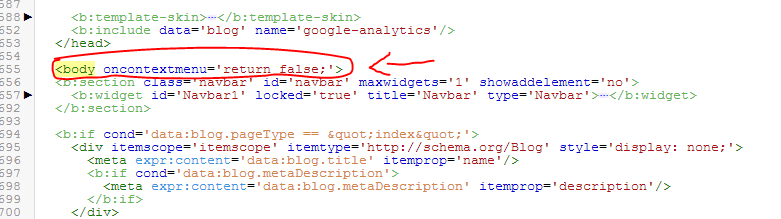
oncontextmenu='return false;'
After pasting this code your tag must look something similar to this.


5.At last save your template and have a look at your blog,from now you won't find any more right-click thingy's on your blog.

FINAL VERDICT:

Err....i said that i would even tell how to secure your images rite??!!hmm...Nothing to worry, by this simple code it is true that your images are secured  if you don't believe me do check it out on your own blog itself
Or check out the proof(link) given at the top of the post.
I hope this works out with you too,if you face any problems regarding this please comment and know your solution.
Read More

Saturday, 5 July 2014

WHAT ACTUALLY REQUIRES TO MAKE A UNIQUE CONTENT


When ever you're trying to find few information on "how to increase traffic?'" or Few strategies based on traffic,For improving your blog's performance You would always come up with  Few lines as follows:
1.Content is the king.
2.Always Write A Unique Content.

Ah.! This is pretty boring but one of the most important factor for traffic and what actually makes a Unique content!?,Unique content is the post you write which is always addicted to your readers and they would love to read it!This happens only when you satisfy their needs,You can only satisfy their needs when you cover up all the required information on the based topic that you are posting.
Let's Have a clean look on the basic tips required to Make a Unique Content.


A.COVER-UP THE NECESSARY INFORMATION

This is the part where you decide your traffic amount, people are always in search of one or the other thing So  If you're in a way to posting a article based on Fruits,Here you need to provide all about Fruits from the scratch till what knowledge you have on Fruits, This helps in gaining others knowledge and your traffic,Yeah! i do accept that if you pull up your content to a longer side many feel it boring and reject your article and won't be visiting your blog for the next time.!What i basically mean is that Write contents which are short but sweet.
An example would clarify what actually it is:

"Fruit? Fruit is a part of a flowering plant that derives from specific tissues of the flower,in common language fruit means the fleshy seed associated structures of a plant which are generally sweet or sour.
You need to eat fruits as it is one of the part of our life which keeps us healthy in various ways.
Few tasty and top-notching fruits are:
a.Mango 
b.Apple
c.Banana and much more......
As we saw fruits are healthy then we shouldn't take a decision of avoiding vegetables as both plays a vital role of our health.
So, This was a short article based on Fruits and it's benefits. "

In this short para we covered what is fruit? what are it's benefits? why do we need to eat fruits?Few tasty fruits....etc.......
Now i  hope you might be having a basic idea on how to create a Well-known content.

B.YOUR ENGLISH MATTERS

Readers always love to read well-known articles and they would like to learn new things by entering your blog,As in the Above para we can see that instead of "Few tasty and top-class fruits" we've used "Few tasty and top-notching fruits" So here the word "Top-notching" is the key phrase try to use these types of phrases at possible times but don't always do that as it becomes harder for the readers to understand.


C.AND WHAT ABOUT TEMPLATES??

This may not be a main reason behind the Unique content but what all i can say is this brings out a bit of difference in our traffic, according to me i would like to recommend you to keep a simple and quick-loading template and mainly concentrate on your font-style of the blog and this is what the template all-matters about
Do check this out: TOP 10 BLOGGER TEMPLATES.

NOW IT'S YOUR FLIP:

This ends up with few important reasons of what makes unique content,So in conclusion what i would like to tell is take these tips seriously and try implementing it on your blog practically to end up with good results.
Do pen down your suggestions:


Read More

Sunday, 29 June 2014

HOW TO INCREASE YOUR NUMBER OF LIKES AND COMMENTS IN BUBBLEWS


Well it had been  a few time since i wrote my last post and today i'm back with the knowledge of what I've gained,Let's explore it now. :)

Bubblews??
So what is this bubblews ?This is a website in which you can earn money on per view,like and comment on your account usually said as a blog,And this is one of the cool method to make bags of loads,by this you will be filled with excitement to make your good earnings on bubblews,Sure you need to be happy but before then just have look at these below points to rock safely on bubblews!!!
1.Write unique content with 400+ characters not words.
2.Don't copy and paste the info from any website or around the internet as you will never be paid if you do that so.
3.Don't make self likes for more profit!
4.No traffic exchanges or begging for it
5. Pornographic content never allowed.

You can read : HOW TO MAKE 200$ IN BUBBLEWS PER MONTH for getting more information based on this.

So when you are back here after reading that article continue reading this one,So our main aim is to get huge number of likes and comments per post and which is one of the important part in earning your bucks.!
And for this you need to follow some strategies in order to end up with good results:

1.OWN CONTENT

Here you don't need to have any blogging mind or tricks,here you are allowed to post on various categories such as
a.Anime
b.Art
c.Articles
d.Reviews
e.Tutorials
f.Tech
g.News
h.Health tips
i.Entertainment
and much more..........

So when you have these many wide categories to choose then why need to copy?Bubblews contains a strong algorithm which tracks that from which source you have copied and you will be never paid for that.
If you aim to earn then take time and write good stuffs,and don't worry about the traffic as you will get immediate traffic after posting each article.

2.CONNECT WITH WIDE RANGE OF PEOPLE

In the previous paragraph we discussed on traffic and this is the ultimate way to get traffic that's connecting with people,Connect with lot's of people and   do like their articles so they give you the same response in back!with valuable comments too!!And both(yourself and the connected person) will be each time notified by you and the other one when both give a new post,This can be known as a barter system that is exchange of likes and comments.

3.COMMENT

We are known that we get paid for comments on our posts so if you write well you get positive comments automatically which results in higher money paid....If you could not write a ideal content after trying your best,Go comment on others post and be sure to connect with them,after you go up with this process you will surely get your comments back...So isn't this interesting,but be sure not to copy content from anywhere.

4.IMAGES

As we all frequently think that adding images might drive extra traffic to our posts.....yes this is true but wait! bubblews won't pay you if you insert images from internet ,I would like to prefer you not to upload any images yet if you are willing to do so the only go is taking a screen shot or screen capture.

IT'S YOUR TURN.

Now we came across few basics and strong rules by bubblews ,Take these rules too seriously,and this time it's your chance play safe and get paid.
Post-Name
Reviewed by Reviewer-Name on Jul 24 2014
Rating: 5
Read More

Monday, 23 June 2014

HOW TO CHANGE YOUR SMARTPHONE'S FONT STYLE


Whenever you buy a New smart phone and just have a Look on The Font-Type we notify that it is default usually a simple font like Arial,What if you didn't get well tasted of the font??oh...then just continue reading this article you end up with a new font installed in your Smart-phone within no time.So you need to follow few very simple steps to install a new font on your Phone.This doesn't requires any special skill or coding...to do so but after all just an internet connection to download the app,By the word download you are yourselves able to conclude that is gonna be easy and it's totally true.Why waiting Let's Go ahead.

1.Here i'am going to show two of the screen shot that is (before) and (after) for proof.


This Screenshot is before installing the font app.

2.In the above pic we can see that there is a normal(default) font used and now Let's install the new font.
Go to Google Play Store or (iTunes) And Search for "Scriptfft",This the the app which we need to download
Navigate there and download the app


3.After searching the related keyword you will end up with this result.Now i would highly recommend you to download the first one which is in the image because that is one which works well on all the Smart phones and provides various of Fonts,But one thing to note that is here the types of font that we are going to get are gonna be italic only.

4.So as soon as you download the app just open it,When you open the app you can see loading on progress for this just hit the back button because there's nothing loading over there and there will be no changes made.
After you hit the back button click on "Change your Font",Now it will redirect you to settings and ask you to set your font,Now click on Set font or font style(differs) After you click you get various font styles just select the one you like after its done it asks for "do want to set this as your font" just click ok.

5.After this you need to reboot your Smart-phone in order to install the new font just pass this step and you're done.......Now you have your complete new font ready on your smartphone.


This is the new font style.
In case you are willing to change your font once more just follow these steps and you will get done with it.

I hope you enjoyed this article..stay connected for more new tuts. :)
Read More

Saturday, 21 June 2014

TOP 10 BLOGGER TEMPLATES

Previous Time We had Discussed on HOW TO UPLOAD A CUSTOM TEMPLATE,and today we are back with another interesting topic,in this post we will have a look on all purposed,Responsive,Port-folio and much more........And interestingly we have chosen Top-Class Templates all for Free.......Here the Number or the Ranking doesn't matter The basic purpose of this Article is to provide few good,user-friendly templates for blogger....So Let's start Having a Look At those:

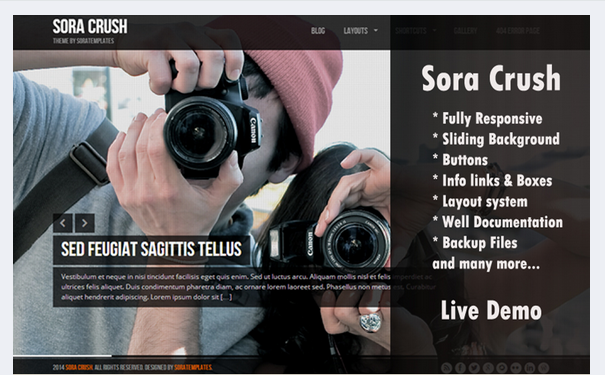
1. SORA CRUSH
First-of-all i would like to introduce with Sora Crush,If you are Finding a port-folio blog this would be an ideal decision of having Sora Crush on your blog,This template offers various options and highly customizable,The main thing that impresses the visitors is the background and for more attraction they have used sliding background with amazing color combinations and well set up,This template is multipurpose and looks best for any of the use.This template comes from Soracrush.com
                   DEMO                                                                                    DOWNLOAD

2.VIDEO MAG
If you are thinking of making a blog based on videos i would highly recommend you to download this template,as this is completely  responsive and specially designed for video purpose,The main factor that is required for a Video blog is Clarity,Resolution,Frame.......And Video mag Wins all these requirements.Video mag even displays related videos just like popular posts so isn't that cool??Basically what i can say about this template is having this for your video blog would surely gives a Great Look and drive some good traffic for your Video blog.This template is created by way2themes.com
       DEMO                                                                                                            DOWNLOAD

3. ANDROID MAG
As The name says that this template is mainly dug out for Android,Apps, and Gadgets Lovers.In this template the main theme used is Green which matches The Android color.....So by this you would have probably getting flashed with the interesting template,This template is responsive and SEO friendly too.
You can choose this template happily if you have a mind going on with a Android Related blog.This template is offered by templateism.com
        DEMO                                                                                                          DOWNLOAD

4.INDONESIA
Ah........Am i kidding with this name???of course not!!! Name seems to be quite funny but has a great result.
This template is compact with no Unwanted styles,It has a Great finish with Great looking image slider at the top,This slider notifies your visitors or the readers with New posts posted,This template isn't special at the menu looks but mainly concentrates on user-interface..You might have heard a WordPress Theme Heuman??!! If you are very needed to that kind of template stop starring at the WordPress template because this Template Provides the Exact Same Features......So Head on to the Template and get satisfied yourself! 

     DEMO                                                                                                                    DOWNLOAD

5.KARMA
As This Template can be said as One of the Best Landing-Page ever made for free,With Awesome Animation and Clear Look With a image-slider at the Top,This Template Gives a good Navigation for the reader and interactive too!!!These words can speak out the actual power of the template and the way it's coded and you've been Provided with all the Social media Icons and it can be customized at your wish!!!
The background is made simple with attractive foreground for a perfect combination and better load speed,So this even includes that this template is SEO friendly.A Demo would give you the perfect characteristics of the template.

     DEMO                                                                                                                         DOWNLOAD


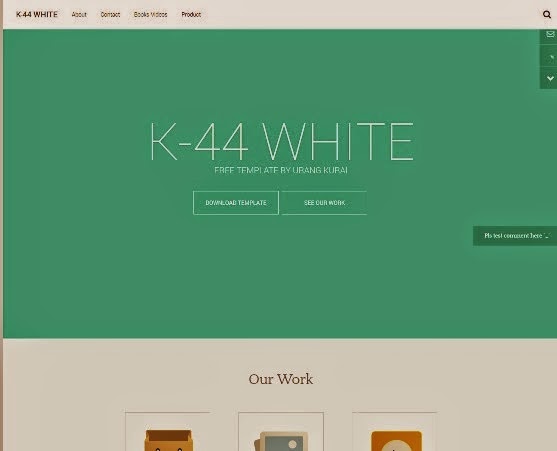
6.k-44 WHITE
This template is very less known but has great and massive-features this template is made by urang-kurai
and there are many templates from that website,Mainly this is a port-folio themed template with a blue-green(mixed) background and few of animation,This gives a magazine look and keeps your posts very compact.This template is published by kaizen-templates.
    DEMO                                                                                                                           DOWNLOAD


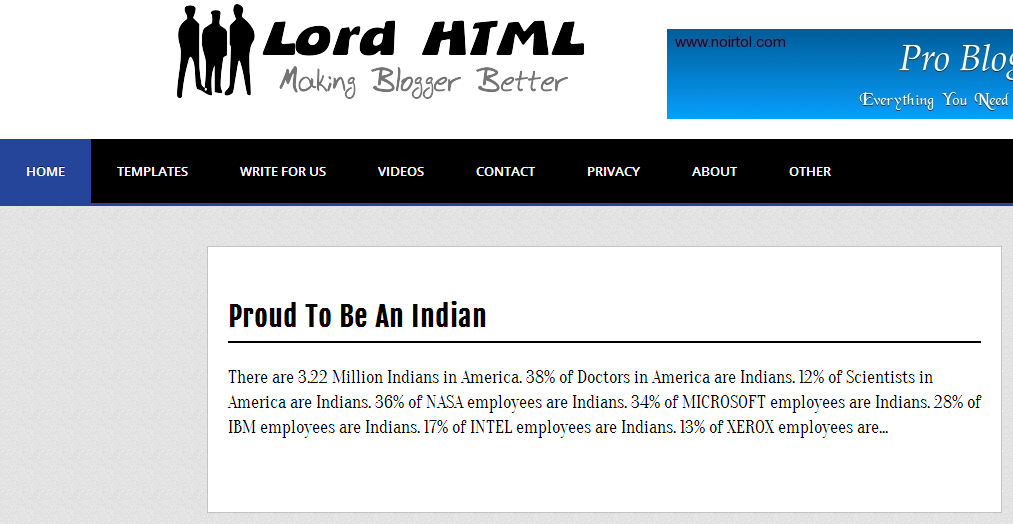
7.LORD HTML 
This is a very simple template which only concentrates on the simple body style but there is a specialized drop down menu of dark-blue which mainly attracts visitors and this template intentionally give a official look to the blog,So if you are in a way to create a blog with Lot's of informative things This Would help you out making your blog look clean with ease.
   DEMO                                                                                                                       DOWNLOAD


8.KEILIR
This Template is Multi-purposed and responsive This gives a great look for your blog for niche based topic, in case if you are having a video blog then this would match your style and need and if you are having a informative blog based on tech even then this suits your style......At the right-side you will be provided with a simple popular post widget with round thumbnails and the images which you insert in your blog will out out-taken with high resolution and better clarity,Their will be a zoom effect on hover of the image with bold and clear texts.
   DEMO                                                                                                                   DOWNLOAD

9.MAGFOLIO
A Clean Aligned template with good borders between posts and good navigated menu,There aren't any drop down menus but the interface and interaction is good........The main thing to tell about this template is The social media icons The developers have designed it so well with gaining original color of the website on hover Rather than this the text format is also good.This template can be used for android and technology based blogs.And there is a threaded comment system which is one of the main factor of choosing a ideal template.

10.RED HOOD
So here comes another portfolio template!!! You may be frustrated with all of portfolio themes...!!The only reason why I am showing portfolio themes because portfolio themes makes you blog the best ,so here are may choices for you to pick out with.This template comes to your need if you are a web developer and show-case your done!!It displays your work in a pretty good manner and readers would love to visit the blog again and again for the template basis.
    DEMO                                                                                                                      DOWNLOAD


FINAL VERDICT
I hope enjoyed reading this article and choosing your most liked template.......Stay tuned for more and more articles.
Read More

Friday, 20 June 2014

HOW TO MAKE FREE CALLS FROM FACEBOOK


We are renowned regarding voice-mail in Facebook and the way to go up with it and currently there's a brand new feature of Free voice calls,It looks pretty smart once we think about free calls,And now The Facebook developers have made it potential.
Free calls from Facebook provides huge advantages like:
1. Unlimited length of speak
2. No deduction of balance
3. call any of your Friend without Phone no required.

So until now we have seen Few advantages of Free calls from Facebook and there'll be in fact few disadvantages,But currently we'll find out how to make free calls from Facebook and later on Discuss few disadvantages.
Let's Start:
1.First of all to have to own Facebook app installed on your android or iOs device.
For this go to "play store" and search for "Facebook" As soon as you go along with showing results download the Facebook app,Or Click on this LINK .
2.As the download Completes Open the app and sign in with your respective Email Id and password.It takes few Time fitting your Profile,After your profile is set up head on along with your profile.
NOTE: Free calls can be created solely who are active at the time of call.
And The Person whom you're tending to make Free call should be active only in Facebook app.
This Screen Capture will assist you resolve the actual Reason.


As you can see that Free call isn't accessible for first Person,whereas it's accessible for 2d Person.
Possible Reasons:
A.The 1st person is inactive or does not use "Facebook app" Or not Active in "Facebook app"
B.The 2d Person is Active,Uses "Facebook app" and active in "Facebook app".

3.So currently you're clear with possible reasons,Hit on free call for whom the call is offered
And currently you have Learnt a way to create Free calls Via Facebook.

DISADVANTAGES:
1.Call connections are poor at several areas.
2.Gets disconnected once web affiliation is down.

Hope you enjoyed Reading this text,Do comment If you discover any problem And Stay tuned for more articles.

RECOMMENDED TO READ: 


Read More

Saturday, 14 June 2014

CLASSIC TIPS TO INCREASE YOUR ALEXA RANKING

ALEXA is one of the most important factors affecting your page rank and Every search engines mainly concentrates on your alexa ranking to rank your blog or website in search engines,better rank in search engines results to better traffic and for this the ultimate base is alexa ranking,So in this article we are going to have a look at few tips and tricks which helps to better your alexa ranking.


UPDATE REGULARLY
Readers would always be curious to find new and new posts on your blog and this helps in increasing  traffic So keep updating your blog regularly and always do-promote your posts through Social media networks,Facebook,twitter etc... For more exposure.

INSTALL ALEXA WIDGET AND TOOLBAR
Indeed to be frank even i don't know the exact reason that installing alexa widget and toolbar increase your ranking but iam so sure that you will  get a massive jump after installing the wiget in your blog and toolbar in your browser,You can go to this LINK(this link is for chrome users only) And you need to to follow few simple instructions and you will get done with it! now comes installing of alexa widget on your blog,
as according to the new updated alexa we are actually not getting the HTML code for your blog,so if you need to install the widget on your blog you have to install it manually.You can get the widget in many various sizes but now iam giving you the ideal size which fits for many of the blogs.

1.Copy this HTML code

<a href="http://www.alexa.com/siteinfo/yourblogname.com"><script type="text/javascript" src="http://xslt.alexa.com/site_stats/js/s/a?url=yourblogname.com"></script></a>

2.Now go to Layout>Add a Gadget>HTML/JavaScript>(leave the title blank)Paste this code in the content box>Save.!!

So now you have got the widget on your now wait for 2-3 days and see the change!!.
For more better results for your blog recommend your friends to install alexa toolbar on their browsers.

WRITE UNIQUE CONTENTS
We all might think that it's easy to maintain the blog!!So what we usually do is just update regularly but just updating it Won't bring any benefits out to you so what you need to do is write unique contents!!What is unique content??Unique contents are nothing but something that makes the readers get interest to read the whole article,What factors are required for unique contents??Good english with proper usage of grammar
use few of phrases,idioms etc....And one more point that is always write posts related to your blog's niche because for ex.If a reader is trying to find some articles on "sports",he gets your website to read the article and he finds that the blog is all about 'technology" These types of stuff collapses your traffic and increases the chance of getting removed from search engines.

EARN QUALITATIVE BACKLINKS
Backlinks??Backlinks are the links which links to your blog...backlinks is another main factor causing alexa ranking and page ranking.....as these links weights up the blog so it is considered as important part,backlinks helps in better page rank which results to better traffic so if you want some good traffic earn backlinks.The common  ways to earn backlinks is through guest posting,commenting on other blogs..etc...

NEVER USE BLACK-HAT SEO(SEARCH ENGINE OPTIMIZATION)
What are Black-hat seo??
It's a negavite method used in SEO and there are lots of wrong stratigies used to make few bucks from that,
Using these types of tactics You will get banned from search engines,Few examples of SEO:
1.Submitting of fake content
2.Unrelated keyword
3.Disobeying search-engines
etc.....

So Black-hat SEO alwasy gives many disadvantages with only a single advantage,and if you start using this method your blog's life span comes to an end.So i would highly recommend you to stay away from this and always blog with fun and write well.Implement all these tips on your blog and this is my personal guarantee that you will get huge traffic.

I hope this post helped you do comment if you have any doubts regarding this. :)
Read More

Friday, 13 June 2014

HOW TO DOWNLOAD VIDEOS FROM YOU TUBE ON YOUR SMARTPHONE


Well many a times we will to download and watch our favorite videos because we can watch the videos without any buffering sensation or lag.We usually think of you tube downloader when we are tending to download you tube videos.But how can we get for android??Actually the thing is we won't get the perfect version of you tube downloader for android,if we try searching the app in Google play store we return with these kinds of results.
As these above screen shots gives you readers a perfect idea that what results we get so as these apps wont work out perfectly so the only go is to find a unique app that functions the same as you tube downloader.
So the app which we are going to use is tubex this may less known but amazing workout by the developers.
1.head on to www.tubex.me or click HERE.
2.The screen may now look a bit blank co there are only few screen shots of the app.
3.Now click on download,you will be redirected to new page with two apps as easy tube3.0 and TubeX1.8.0
And now you are given a set of features of both the app but i would highly recommend you to download TubeX as it is easy to handle with.
Now you have successfully downloaded the apk and now it's the time to install we might wonder that why is this not installed automatically??The reason is  that we have just downloaded the apk format from Internet but not from Google play store or iTunes 
4.Now go to the path where you have downloaded the apk and click on it...And it will be installed automatically.But you might find a error message like "This app cannot be installed because it is downloaded from unknown resource" or something like that If you find yourself in such a situation follow the below steps:
Head on to Settings>(Device)Apps>and tick on Unknown sources(Allow applications of Non-market applications).
5.So by this step you will be solved with the common problem faced during the installation.
I hope this work out with you too.
If you face any problems regarding this please do comment below we are here to help you.

FEW ADVANTAGES OF TUBEX
1.Play,download,share any video on the spot.\
2.Download the video at any clarity of your wish.
3.Easy to handle.

DISADVANTAGES
1.Gets hanged many a times.
2.We can download only one video at one time(can download 1video at once.)
  
Read More

Monday, 26 May 2014

HOW TO MAKE A uTORRENT AUTO SHUTDOWN


As we all know that u torrent is one of the best software for downloading anything whether it is a mp 3,mp 4,games,movies etc..that doesn't matter but it performs the best for downloading any type of format.....and we usually won't have the patience for sitting font of the computer when the downloading is taking place,so the best solution we find is to download at overnights,but in case if gets downloaded early and the PC is still on with no work being done...we can say it as a complete dumb work and waste of electricity bills.....So the thing which we want is auto shutdown!!! but do we need to program anything for this perfect output????no way indeed this is a very easy where auto shut down is made simple,this article gives an complete information on how to auto shut down PC after the download completes for newbie torrent users.....

1.When we switch something for download in u torrent we can't wait till the download is complete so if we want to have auto-shutdown follow this simple way........
i)Open u torrent,click on options located on top-left corner


ii)after clicking on options you will be able to see a dropped down menu with various sub-options.
Now go to the last option that is "auto shutdown" and hover on it!!!


2.Now after hovering you will again get more options now just click "shutdown when download completes".
So you are done with it this works perfectly only when the download is in progress if you have any queries based on this just comment below and i will help you solve your problem......
Read More

Sunday, 25 May 2014

HOW TO ADD MARQUEE IN BLOGGER

Marquee???So what's this??This might not be acquainted to you however once you browse this article you may start with smart results for your blog okay let's learn few stuff on marquee from the scratch ......... :)
In easy words to say marquee is a scrolling text!!! over as easy as that this wasn't honest !!k let me pull it a bit more!!! ;) it's a scrolling piece of text that comes sporadically in a exceedinglin a  particular box this provides an nice look to your blog as well as it keeps your readers up to date, by this you must have understood that marquee is something really cool........!!!!!!!
ah........So we had a good talk on marquee then what about putting in the blog??Let's head on........
This includes an easy procedure with lot's of editing........

1.Go to blogger dashboard>layout>Add a gadget>HTML/Javascript>
Now copy and paste this code into HTML/Javascript..

<marquee bgcolor="yellow"
behavior="scroll"
direction="up"
loop="infinite"
scrollamount="5"
scrolldelay="6"
height="60"
width="110%"
hspace="12"
vspace="15">
<font face="arial" size="9" color="black">your text to be displayed</font>
</marquee>


Looks pretty however straightforward to handle with.......So now it's editing time....
1.You can change the marquee bgcolor as you want,in the code I have given as yellow you can change it to any color as you wish but one thing to not that's sort the colour name only in capitals or little or else you will not get the output this can be suggest for all.....

2.Change the direction sort as right,left etc.....

3.Scroll amount is that the time taken to display the text and this is counted in seconds...

4. Scroll delay is that the no of seconds where the next display takes place.

I think you'll be able to manage with height width hspace vspace etc....... however if you have got any doubt relating to these you can comment below and that i can assist you get solved with your mess
Now returning to the type of font, you can knew there's not any great difference out there The changes you'll be able to is only is simply of the size and therefore the type of font.....
Now change the output text as of your want. currently i'd highly suggest you to put it at the top as this looks something like recent updates or breaking news......If you want to put it in different places change the height width hspace and vspace and you will get through with it......


It's your flip.......
So however we tend to learnt nice things on marquee now it is your chance try up with it and have a good time putting in the marquee style in your blog


Read More

Monday, 19 May 2014

HOW TO UPLOAD A CUSTOM TEMPLATE IN BLOGGER


We perpetually wanna have a pre-designed guide because it offers a really sensible look to our blogs and mainly we've got several selections to travel up with. we tend to get associate with many advantages of getting an custom template because it is understood to be higher than what we tend to try to do manually we tend to even get a bundle of templates from blogger facet nonetheless several a times we tend to aren't glad with it and it's probably user friendly and even the planning of the blog plays a important role for trafficking well I actually said few sensible words on having a custom or pre designed template however what regarding "how-to?" eh........As this was as very easy to know as 123 even the work spot is that the same.........So why to wait???
1.Go to www.templateism.com  or www.btemplates.com
But i extremely advocate you to urge your template from templateism.com because it offers the most effective templates for you folks,after you download your hand-picked template progress to ensuing step........

2.So currently you've got the template and may have alittle guide for editing your template but how on earth to get it installed in your blog??????ah.........This looks pretty complicated however not..............
Now your work is to upload the .XML that you've got download a couple of time ago thus Let's upload it...

3.Go to blogger dashboard>Template>Backup/restore.


4.I better prefer you to download your current template to maneuver to a safer facet ,this is optional however counseled...... ;)

5.After you download your present template  click on "choose template" and choose your .XML file and so click on "upload"

6.It takes a couple of time and once the .XML file is uploaded you've got your current hand picked template installed on your blog.............Good luck guys........


STILL DIDN"T GET??WATCH THE VIDEO HERE:
Read More

Sunday, 18 May 2014

HOW TO ADD READ MORE BUTTON IN BLOGGER


We usually add read more button to attract the viewers and to gain extra traffic this might be a wrong stuff at some point yet it adding read more button gives a decent look to the blog and even makes it compact so the readers who don't have any idea on how to add read more button have landed to the ideal place to have a customized look of this button this guide provides you with how to add read more button and how to customize it.....
So let'get started

1.After writing a post click on "insert jump break" icon


2.When you click on this icon and save your post you will be okay with the button,but what if you are not satisfied with it???So now it's the time to customize it.......

3.Within 2 steps you learnt how to add read more button and we will customize it's looks

4.Go to blogger dashboard > Template > Customize > Advanced > Add CSS .

Now copy and paste it the CSS space provided

.jump-link {text-align: right;}

.jump-link {font-size: 100%; font-family:"arial" , cursive;}


5.You can make a much of editing in this 2 line simple code
You can change "right" into left or center depending on where you want to have your read more button
Then you can change the font size and and the font type as your desire,If you dont want to have an italic style of the font remove "cursive"........

6.So you finally got it........... :)
Read More

Thursday, 15 May 2014

SITEMAP FOR BLOGGER

Well it had been  few time since writing my last post....the reason why is i was researching for a novel content for you folks and that i have landed with a tut teaching you how to upload a sitemap in blogger,So before intensifying this we'll have a short information on sitemaps and it's structure.

What are sitemaps??
Sitemaps are protocol that informs the webmaster whether or not the Google webmaster or the bing to tell a couple of explicit url that is eligible for crawling in search engines and it's Created in an exceedingly XML format that helps the search engines to administer a stronger ranking by providing extra data to the webmaster tools,So by hearing these points we'll be able to conclude that Sitemaps plays a vital role in SEO(Search engine optimization) therefore primarily we'll even grasp that sitemaps even helps for a stronger traffic.......

Structure of a sitemap...... 

User-agent: *
Disallow: /search
Allow: /

Sitemap: http://www.Yourblogname.blogspot.in/atom.xml?redirect=false&amp;start-index=1&amp;max-results=500

Ah............this appearance easy however pretty helpful..........
Copy this code and alter 'Yourblogname' to your blog name and then paste it in following place by following this path:
Blogger Dashboard>Settings>Search preferences>Custom robots.txt>Enable>Paste........>Save changes.

So you've got a sitemap........................ :)


Read More
badge